Designing a Risk-Aware Access Control System
CLIENT
: Personal / Conceptual Project
PRODUCT
: Permission Management System (SaaS)
DURATION
: 2 Weeks
CAPACITY
: Sole Product Designer
TEAM MODEL
: Independent
STATUS
: Concept · Not Shipped
IN A NUTSHELL
A risk-aware access control system that helps admins understand the real-world impact of permission changes — before they happen.
IMPACT
Effective access visible before every change, not after
Zero silent high-risk changes — all require explicit review
Single screen to fully debug any member's access state
Platform UX
Systems Thinking
Decision-Support Design
Context
Permissions are a decision problem, not a settings problem.
As teams grow, access control breaks down — not because admins configure things wrong, but because the system never shows them what the outcome actually is. A role change can silently affect dozens of users. Issues surface only after access is live.
This project redesigns permission management as a decision-support surface — making every change visible, deliberate, and safely reversible.
The Problem
Three gaps made every change feel risky.
Invisible Outcomes
Admins configured roles and permissions, but never saw the resulting effective access.
Silent Blast Radius
One role change could affect many users. The system never surfaced the impact beforehand.
No Recovery Path
Mistakes were only visible after access went live — with no structured way to undo them.
Core Insight
Admins weren’t failing to configure correctly. They lacked enough information to know if their configuration was correct at all.
Research & Discovery
Understanding where existing systems fails
To understand how real-world permission systems work at scale, I conducted a competitive analysis of four widely used platforms: AWS IAM, GitHub, Notion, and Slack.
AWS IAM
Strength
Granular policy-based control
Gap
Extremely complex mental model
Lesson
Surface effective access clearly
GitHub
Strength
Clear role hierarchy
Gap
No preview of affected users
Lesson
Show impact before applying changes
Notion
Strength
Simple role model
Gap
No exception mechanism
Lesson
Use overrides instead of new roles
Slack
Strength
Workspace vs channel permission separation
Gap
No clear recovery tools
Lesson
Permission changes must be auditable
Audit conducted by reviewing public documentation, help articles, and hands-on exploration of each platform's admin UI.
DESIGN EXPLORATION
Three Approaches I Considered
Before committing to the final design, I explored three distinct approaches to the core problem of making
permission changes safer. Each had genuine merit — and real tradeoffs.
Simulation Mode
Rejected
Approach
A dedicated 'sandbox' environment where admins could trial permission changes without affecting live access.
Changes would only go live after explicit promotion.
Pros
High safety — zero accidental live changes
Engineers would love the mental model
Cons
Adds cognitive overhead for simple changes
Dual-state is confusing: which is 'real'?
Likely underused — admins skip straight to live
Too much friction for routine changes. Better suited for CI/CD tooling than admin UX.
Permission Diff Panel
Partially adopted
Approach
A persistent side panel showing a real-time 'diff' of current vs proposed permissions as the admin makes
selections — similar to a code diff view.
Pros
Real-time feedback without modal interruption
Familiar mental model for technical admins
Cons
Diff is about permissions, not affected people
Doesn't solve blast radius visibility
Non-technical admins find diffs confusing
The live Effective Access panel in the Permission Editor was directly inspired by this idea.
Impact Review Step
Selected
Approach
An interstitial review step between 'save' and 'apply' that shows exactly which members are affected, how
their access changes, and what the resulting state will be.
Pros
Surfaces the blast radius in human terms (people, not permissions)
Reframes 'Save?' as 'Here's what happens to real people — confirm?'
Intentional friction aligned to actual risk
Cons
Adds a step to every role change
Risk of click-through fatigue if not designed carefully
The intentional friction is the point. High-risk changes deserve a pause. Friction is a feature.
System Model
One source of truth: Effective Access.
Most permission systems stop at configuration. This model adds two more layers — Overrides for real-world exceptions and Effective Access as the always-visible outcome.
Roles
Permissions
Overrides
Effective Access
Audit Log
Design Decisions
Six decisions that shaped the system.
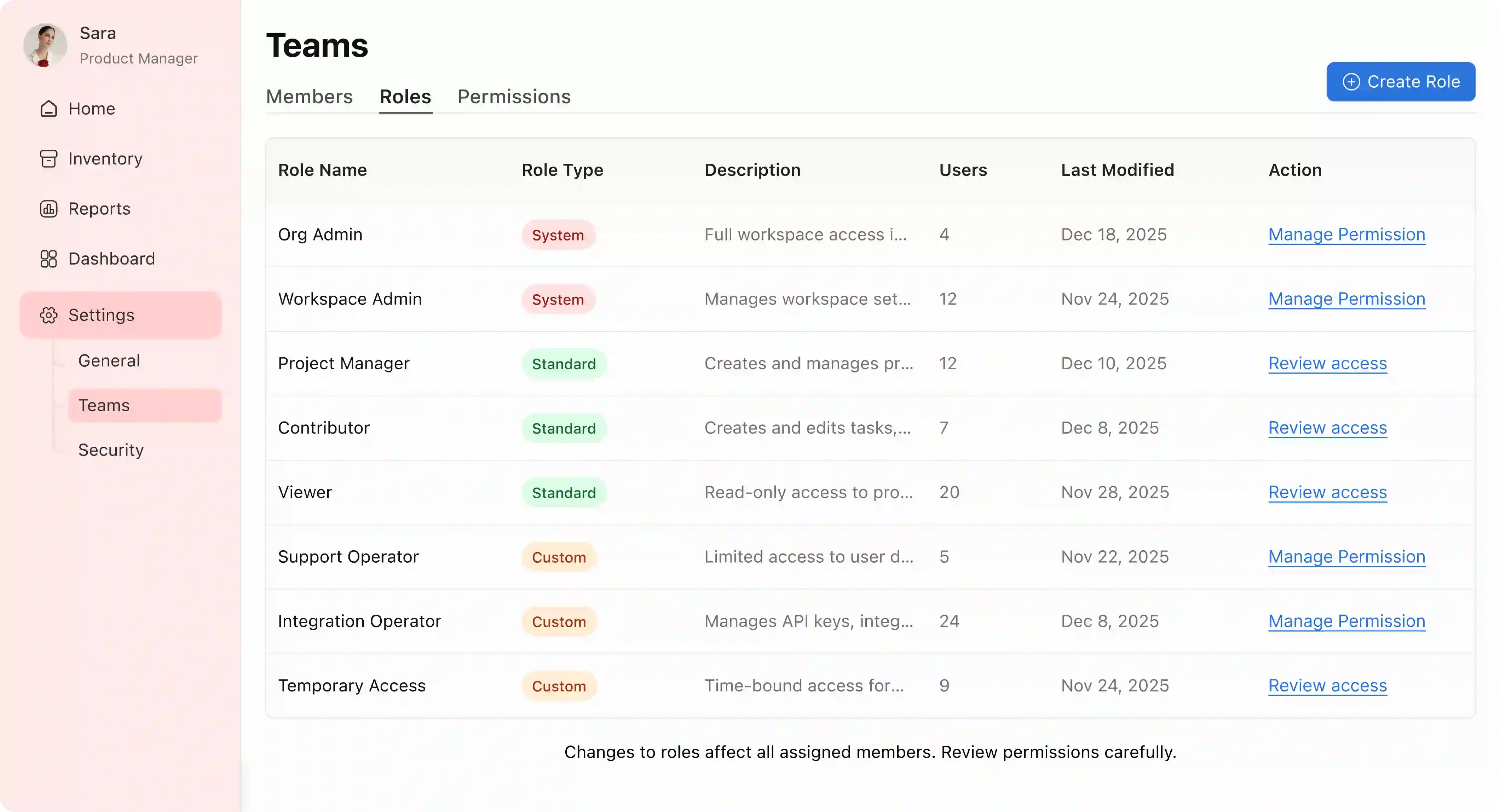
01 — Roles Dashboard: Ambient risk awareness
Member counts are surfaced inline, so admins understand the real-world weight of a role before touching it. High-risk System roles are read-only — deliberately trading flexibility for stability.
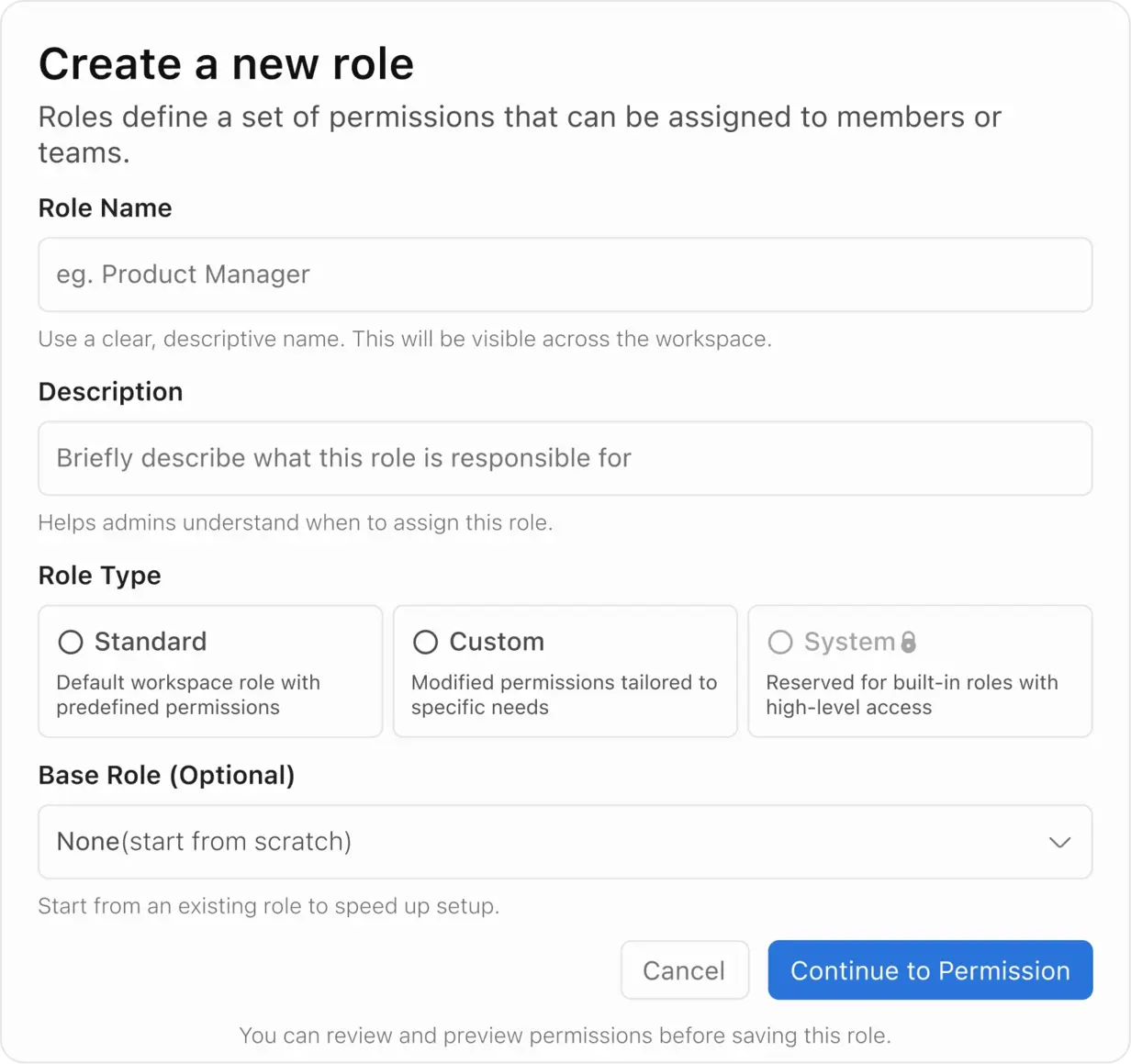
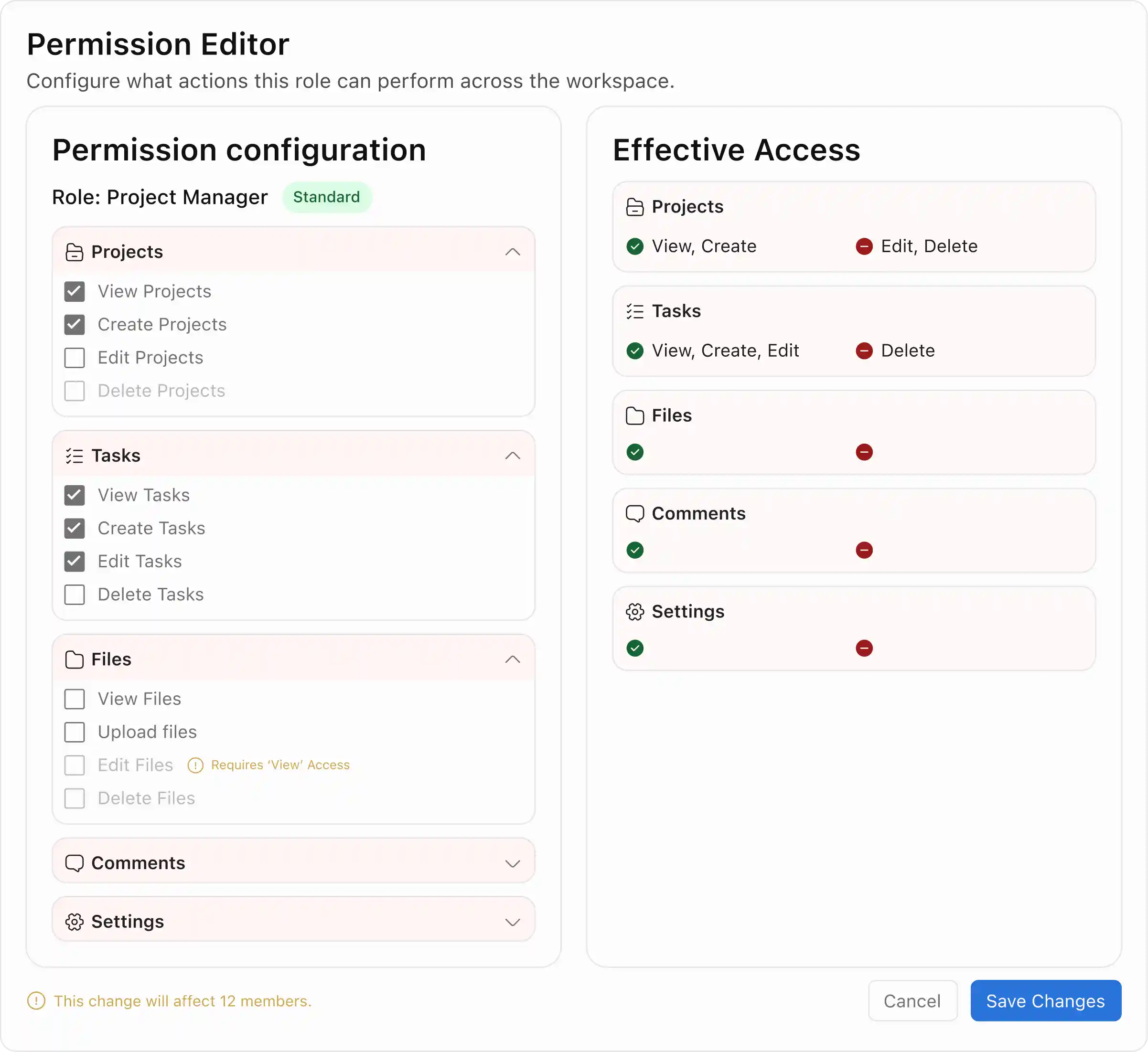
02 — Permission Editor: Logic visible, not inferred
Permissions are grouped by domain. Dependency rules (Delete requires Edit, Edit requires View) are enforced by construction — invalid states can't be reached. A live Effective Access panel updates in real time.
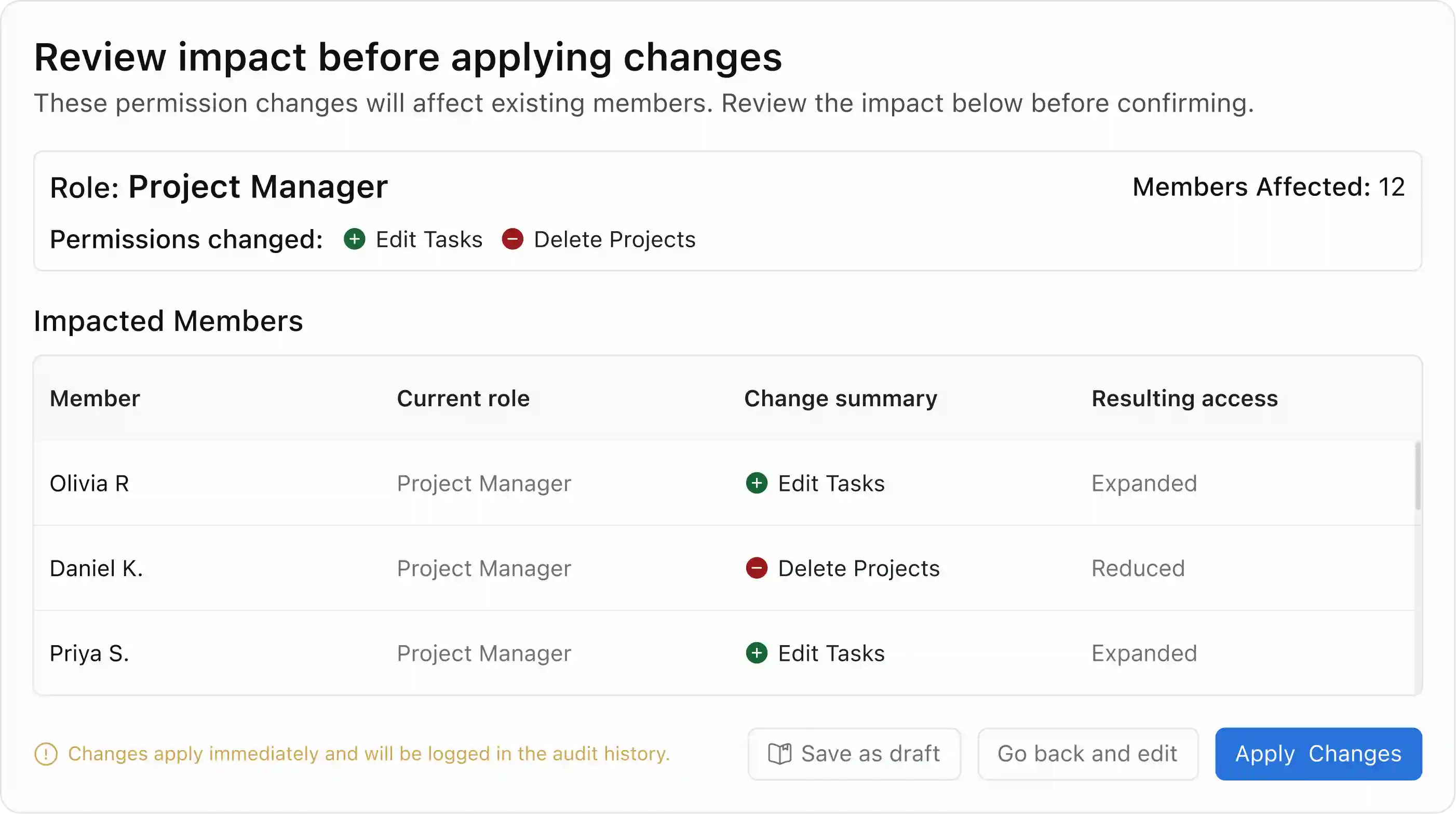
03 — Impact Review: Changes become consequences
Before any change applies, admins see exactly which members are affected and how. It's not a confirmation dialog — it's a decision surface. The framing shifts from "save?" to "here’s what happens to real people."
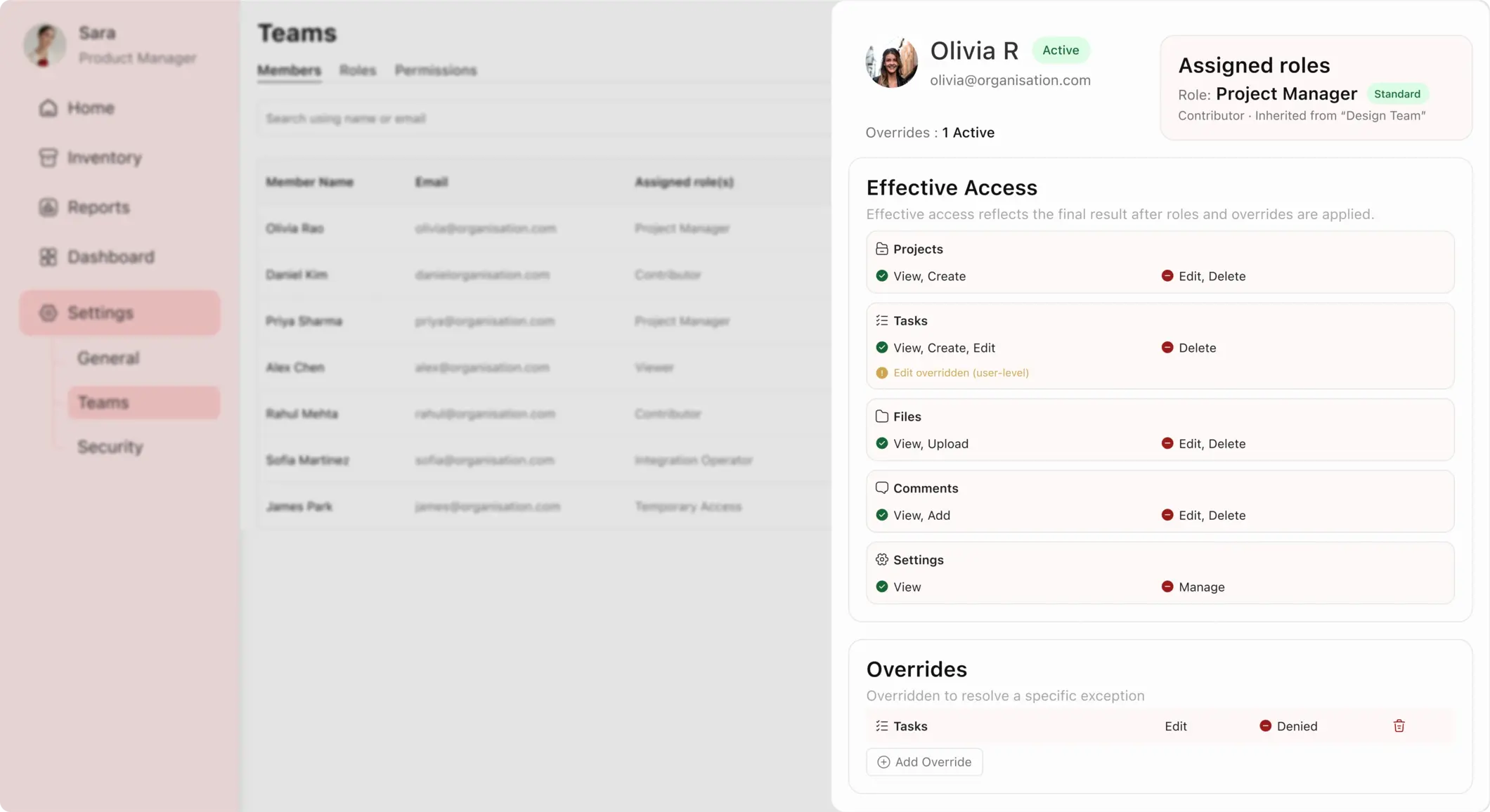
04 — Member Access Summary: One screen to debug anything
Assigned roles, inherited permissions, active overrides, and effective access — all in one place. Eliminates the multi-screen guesswork that makes access bugs expensive to resolve.
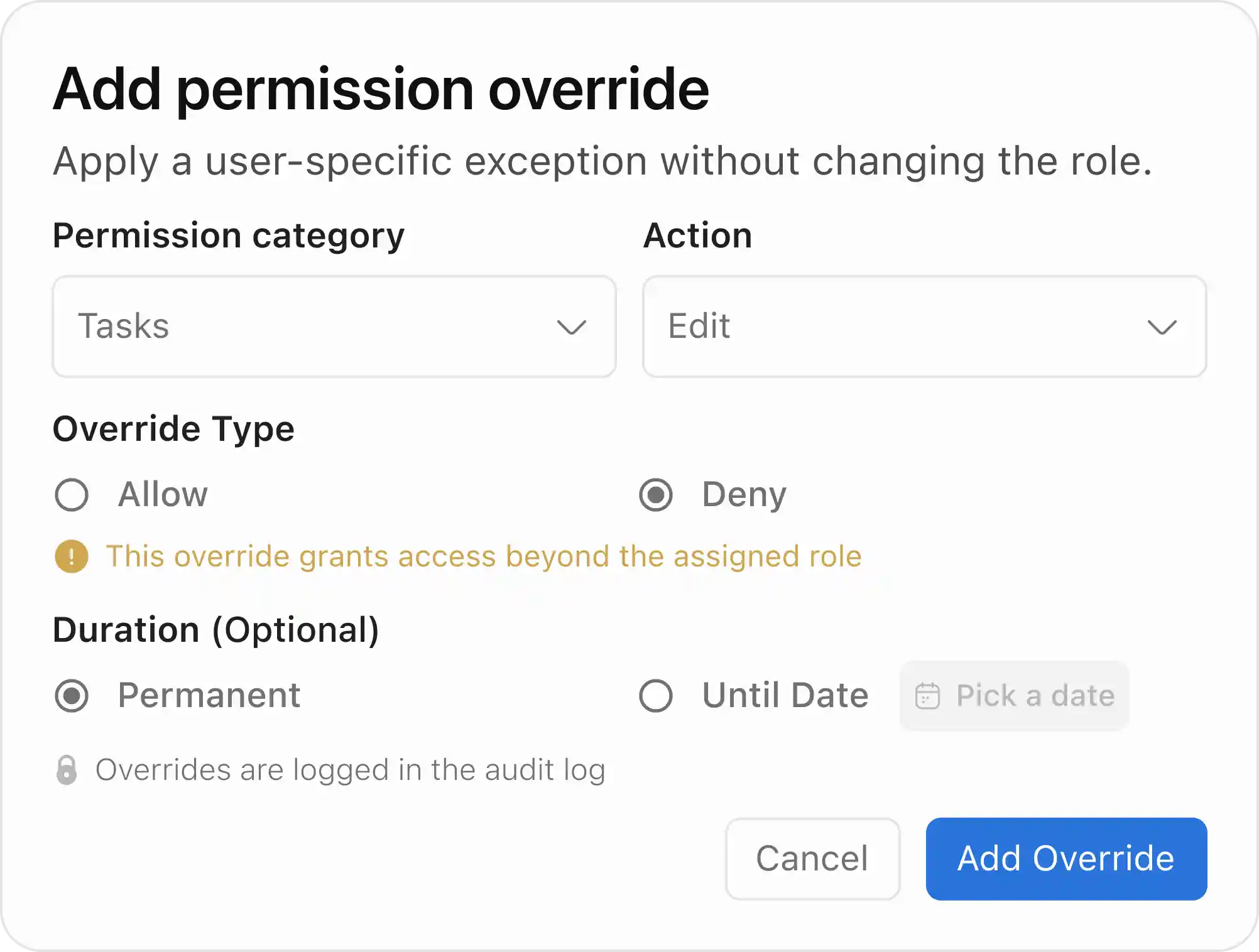
05 — Overrides: Exceptions without role sprawl
User-level exceptions that sit above roles, are visually flagged, and fully reversible. Admins can apply them permanently or set an expiry date — keeping edge cases handled cleanly without polluting the shared role structure.
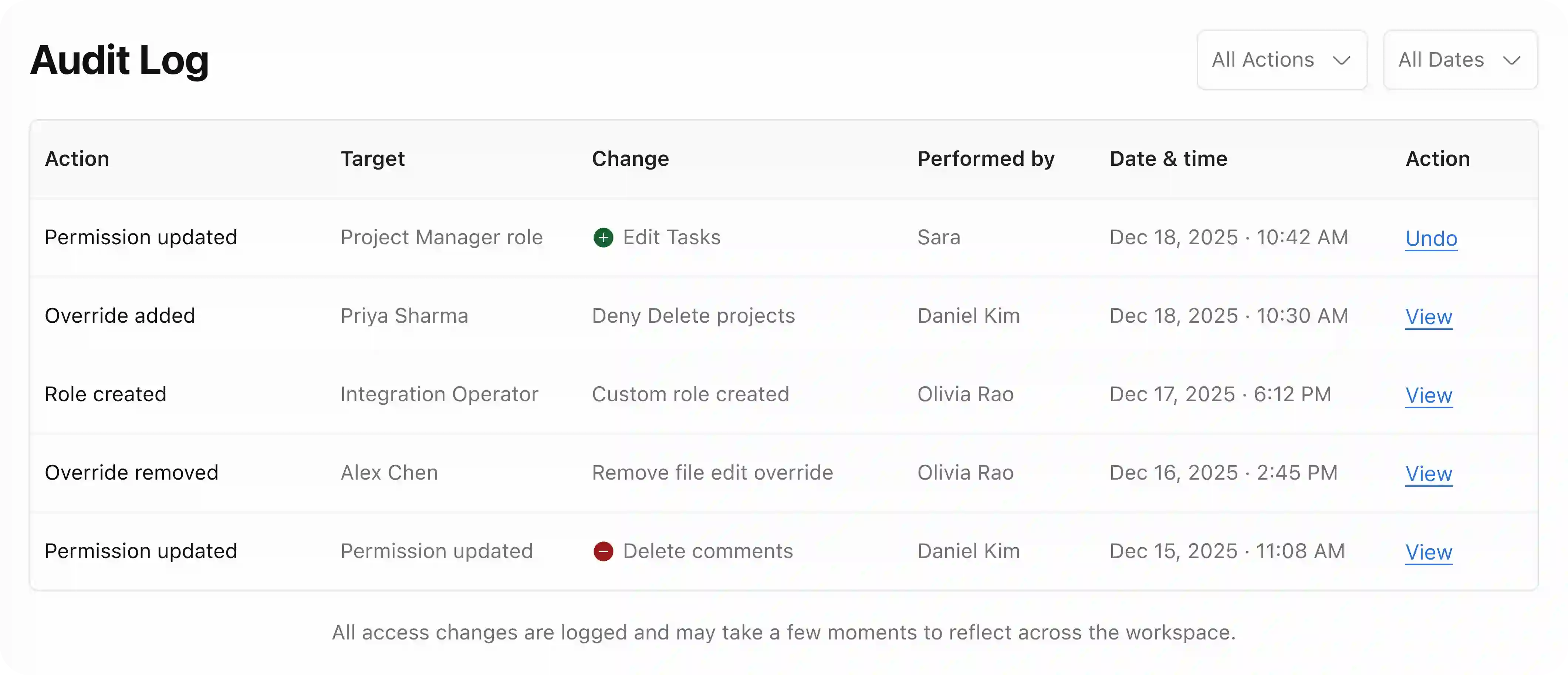
06 — Audit Log + Undo: Designing for mistakes
Outcomes
What the system changed.
Visible
Effective access shown before every change — not after.
Zero
Silent high-risk changes. All require explicit acknowledgment.
1 screen
To fully debug any member’s access state.
No sprawl
Exceptions handled cleanly via Overrides, not new roles.
Learnings
What I'd take forward.
The impact review step adds friction intentionally — but too much can cause admins to bypass it. In production, I'd measure drop-off at that step and validate that deliberate slowdown leads to fewer errors, not just slower workflows.
What I learned most
Designing for mistakes is as important as designing for success. Once undo was built in, the entire system felt safer — not because the flows changed, but because the stakes felt lower.
Always happy to talk about thoughtful product work.
CHAOS
→
CLARITY
Resume
V
I
S
W
A